
The Year Of The Linux Desktop (for fitness games)
Jan 25, 2026
A tale told in memes
I'm joining the bandwagon and declaring that 2026 will be the Year of the Linux Desktop. Specifically for the subset of fitness gaming apps, it's no longer necessary (or preferred) to be tethered to Windows.
Two long-term trends have led to this moment.
Windows has been on a "slowly, then all at once" descent in quality that really started ramping up last year.
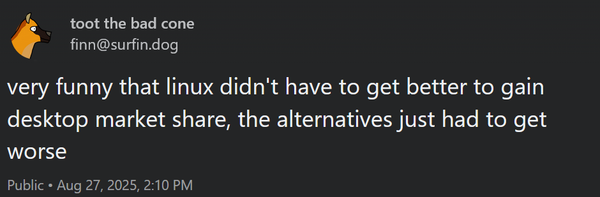
Working with our client sysadmins on a daily basis, I get to see first-hand the OOB patches and hotfixes we've been scrambling to apply (including this weekend when Patch Tuesday broke core RDP functionality) and pray don't make the experience worse. Combined with a "Continuous Innovation" and "Controlled Feature Rollout" strategy that launches features when you least expect it, and it's made everything feel ephemeral and ready to break at any moment. When was the last time you got excited for an update, rather than dread it?
I don't think it's any surprise this corresponds with Microsoft's headfirst embrace of generative AI. Both internally (Satya claims 30% of Microsoft's code is AI-written) and externally (the "everything is Copilot" meme, the rebranding of Edge as an agentic browser), it's inescapable.

At the same time, desktop Linux has been steadily improving and growing more reliable. Some of this has to be spillover from investment in downstream OSes like ChromeOS, Android, and Steam OS, all based to some degree or other on Linux. Core peripherals like Bluetooth work across all my devices I've tried it on, on machines both designed to run Linux and on PCs with random hardware I didn't even check compatibility with before installing.
My Distro
One meme I've struggled with is the tendancy for Linux desktops to start off strong, but degrade in reliability over time.
Historically this feels like a problem I'm also culpable for. A common experience is for userland changes applied to make a Linux desktop functional would inevitably break some unrelated part of the system. Install a new Python 3 runtime for a project, and somehow you've broken your virtual desktop setup, because it relied on 2.7.
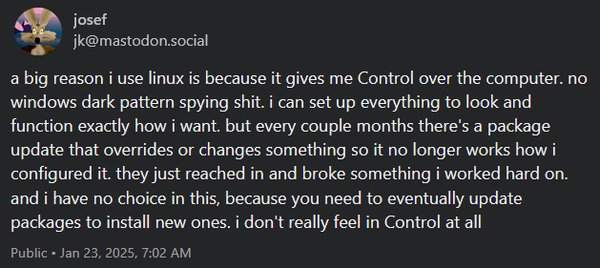
The critical drive lately has been the rise of atomic desktops. These distros are "immutable", in that core filesystems are read-only and cannot be modified, even as root. The OS (and supporting packages) are updated all-at-once, and can be rolled back to a previous release if anything goes wrong.
Almost all userland work is accomplished with high amounts of isolation. GUI apps are Flatpak, and CLIs use Homebrew, so they don't interfere with system packages. Want to setup a development environment? On Bluefin, you're pushed to use devcontainers, so everything happens inside an OCI (here Podman) container.
It's pretty incredible how far you can take this approach. Bazzite (a gaming-focused distro) works so well that it's very common to as a drop-in replacement on Steam Deck (replacing an Arch-based OS). I'm running it on my gaming desktop and spent more time fighting Windows UEFI bugs than I did getting a fully-working setup.
Bazzite ships with Steam and its Proton compatibility layer, but my games need to run outside Steam. How does that behave? Turns out, great!
Zwift
My favorite cycling-themed MMORPG doesn't have a native Linux port and probably never will. It also has quite a few Windows system dependencies (its launcher relies on an Edge-based WebView2), and of course it needs access to a GPU and peripherals like Bluetooth/ANT+. I've been trying to get Zwift running for years with tools like Wine/Lutris, but every attempt at getting it running failed, and I'd inevitably corrupt my environment installing incompatible, conflicting versions of Visual C++ Redistributables.
This has been almost completely fixed with Kim Eik's netbrain/zwift repo - an all-in-one Docker container that setups an isolated Wine environment, installs Zwift, and applies a known set of working patches. The result is a setup that's easier to run than Windows.
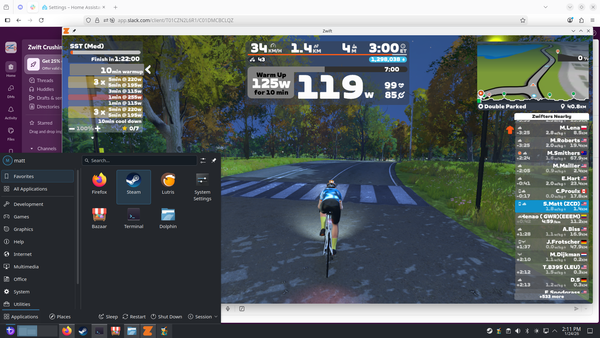
Not everything works yet. In particular, Bluetooth (needed to interact with the trainer, heart rate monitor, etc) isn't available, though there's ongoing development that I'm hopeful for.
In the meantime, I'm setting things up using alternate means. My trainer supports Wi-Fi connections, so no Bluetooth is needed for power, cadence, and resistance. I even set up the trainer on an isolated VLAN (as it's essentially an expensive IoT device I don't have full control over), and Podman was able to discover it after setting networking=host.
Other peripherals (controllers, HR monitors) still require Bluetooth, so I've just got an old Android device running Zwift Companion sitting on my trainer desk. Honestly this is the most "non-native" part of my entire setup, but I'm still using supported tools (and was having to use the Companion even on Windows after an update broke BLE connections).
Zwift runs at a clean 60fps, and I'm able to stream to Owncast via OBS just like before.
Beat Saber
This one I thought would be more challenging. As a VR rhythm game, I'd expect significant hurdles to a clean, performant experience.
My setup has always been a little unorthodox: on Windows I've been running a modded Beat Saber, installed using BSManager to setup extra songs/mods, and control which version I run. The game then streams to a Quest 2 headset, and I pray the latency gods are favorable. I spent the better part of last year getting this setup working well on Windows, and settled on tweaking Virtual Desktop to stream the game, limiting the resolution and frame rate along the way. Other tools like Oculus Link and Steam's own wireless streaming just weren't cutting it.
Turns out, Linux VR gaming is pretty solid these days. The LVRA community has been compiling tools and best practices for years, and many things are turnkey now. Need to stream to a Quest headset? Pick between ALVR and WiVRn. And again, both are installed as Flatpaks, so if you get it wrong, it's super easy to change course!
I went with WiVRn, as it bundles its own, Steam-independent OpenXR runtime, which has been supported by Beat Saber for years. And with a few small changes to the command-line arguments in Steam, I had vanilla Beat Saber running on my headset almost immediately. Interestingly, performance seemed to be even better on Linux than Windows; I was streaming at 120fps (on Windows I limited to 72) and my audio latency was down by nearly a third (~60ms compared to 90 on Windows). This isn't uncommon, quite a few benchmarks a game running on Linux can outperform its Windows counterpart.
Finally, I wanted to get modded Beat Saber running. Luckily BSManager provides a Linux flatpak that installed without issue, and I could download and mod versions just like on Windows. Getting it running on the headset proved to be a much bigger challenge. Out of the box, the WiVRn app list on the device wasn't detecting the modded Beat Saber, so I couldn't start it.
With some help from the BSManager Discord, I found the set of environment variables that needed set (within BSManager) to get it to launch. But the workflow was pretty horrendous: start WiVRn on the PC, then launch the client on the headset. Then take the headset off and launch Beat Saber on the PC. Then, put the headset back on and start playing.
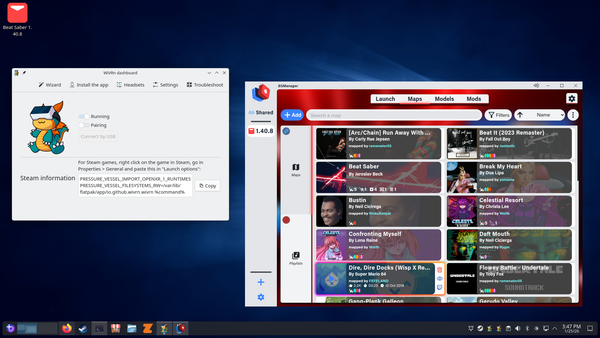
It turns out there were a few bugs in both BSManager and WiVRn that prevented the app from being discovered, and launching properly. With some trial and error (and reading a bit more C++ than I was ready for), I was able to get it running. The details are in this GitHub Issue - and fixes have already landed in the WiVRn codebase.
This feels like a telling anecdote where the Linux gaming ecosystem is at: the fundamental components to play even complicated games are solid, and have been steadily improving. And when things don't work, there's a community to help address it. Hopefully more of this knowledge will get pulled out of private Discords and into public knowledge bases (or simply fixed at the root).
I can tinker with Linux when I need to cool down
I feel like I've just scratched the surface of what a Linux gaming PC can do. My library is pretty small, but I expect to grow it, especially with the Steam Frame inbound, offering another VR headset running Linux directly.
Of course there are other neat features you can try with a Linux machine with a decent GPU. Bluefin's AI strategy is one of local operation and control. So if you want to experiment with LLMs, you can install Ramalama, pull down a model from Huggingface you're comfortable with, and use your own GPU and resources. It feels like a breath of fresh air to have control of what's running on your machine, compared to the Windows experience of "what fresh hell with this restart bring today".

